Wednesday, February 7, 2018

Emagine Entry 2018

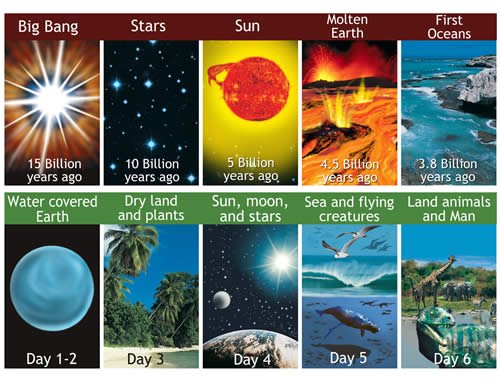
For Emagine 2018 I decided to submit my most recent project, Evolution vs. Creation. It's an animation exploring two of the most accepted and probable theories that the universe and everything in it came from. I try not to take a side; my goal of the project is to present information on both sides so the viewer can have some things to think about so they can determine which side they would take. I try not to cause too much fuss and argument-we're all just trying to find out the truth!


Part 1: The Voiceover

I first created a script that I could then record myself reciting and line up the animations along with it. My script took about 4 minutes to record, which determined the length of my project. I used a soundproof room and the audio recording software Audacity to record the whole thing. It took about 40 minutes, and I even decided to revise my script after I recorded for the first time, adding on another 30 minutes to do it again. I'm not the best speaker, so I did have to splice multiple takes together so I wasn't mumbling and sputtering throughout the whole thing!

Part 2: The Animation

 I made around 35 separate compositions in Adobe After Effects, which I then lined up with my imported voiceover. I added a looped portion of a song I wanted to use, which I reference at the end of my animation. In every composition I tried to use some new kind of effect to keep the audience intrigued and because I'm the type of person to switch things up and transition quickly between many different styles and topics. After everything was synced up, I rendered. It only took like...3 hours to render. It could've been worse. One movie on Netflix and a bathroom break and it's done! I'm satisfied with the way it turned out.

Here's a link to the video on Youtube:

Tuesday, December 19, 2017

Final Reflection

Picture Story


My picture story, iFly, was the first project I worked on this semester. It was different than the type of animation I'm used to. Using only pictures added more difficulty than I initially thought; I had to come up with a story with only pictures, which means I needed an actor and props-things I would typically create in photoshop instead. Making a story without sound also turned out to be challenging. Audio plays a huge role in the overall project. Through this project I recognized the importance of having good audio along with a project because of the extra layer of depth it brings to the story

Evolution vs. Creation


My second project, Evolution vs. Creation took the longest and is the most complex project I have ever worked on throughout my career in Animation. I was set loose for two months to create whatever I wanted as long as I learned something. I decided to choose something that would include a voiceover, with animation and an oration playing at the same time. The oration would provide information and audio feedback, while the animation adds visual appeal for viewers. I broke up my project into two parts. First, I conducted research and wrote a script of what I was going to say. Then, I recorded the voiceover. Second, I stared animating separate compositions going along with my voiceover. I had to focus heavily on timing, making sure when I said a certain thing, the animation coinciding with it would play, adding coherence throughout. I learned how effective this combination of speech and animation is. It keeps the viewer intrigued, all the while reciting lots of information quickly and clearly.

RotoScope


My RotoScope project took approximately 2 weeks of constant tracing for about 2 seconds of content. This project, although tedious taught me the importance of having patience and when to be meticulous or not. Sometimes I needed to be exact to make a certain motion look good, but other times, like during the coloring portion, I opted to utilize the paint bucket rather than painting every part of every layer. This project encompasses an overarching idea found all throughout the animation industry: you put in a LOT of work for a little bit of product, and this project just illuminates this fact.

Tuesday, November 14, 2017

Project Summary

Overview

For animation, I've decided to create a 2D animation accompanying a voiceover that I have already recorded and i ready to be exported into After Effects. My main goal for this project is to create an animation that is timed with a script because I feel like it will be a challenge to do and because I feel like it could be a skill that I can use when I go on to college majoring in Biology. I'm nearly halfway done and I hope to be finished by the due date. However, I have a lot of work ahead of me.

Storyboard


Online Sources

Thursday, May 25, 2017

End of Year Reflection

This year of animation has challenged me to create a variety of works. From a stop-motion collaboration to a series of 24-frame drawings done alone, all of these projects have helped me improve my animation skills greatly. This class has engendered my success in these areas:

Technology
I became much more familiar with Maya this year. I learned how to extrude along a CV Curve, how to create foliage with the brush tool, and many more useful tools that I now have at my disposal. The biggest technological takeaway from this year would be the importance of saving Maya files as .ma instead of .mb and having multiple saves of the same project, otherwise your entire project could be lost due to a single corrupted file. This happened to me early in the year. I was modeling a Tiger Tank. I had spent over 100 hours working on it, but one day, the file stopped opening. It's unfortunate, but at least I can try to avoid this event in the future.

Collaboration
As an animator, it is extremely important to work with others, because it would be overly difficult and would take forever for one person to complete a project that multiple people could easily finish together. I had the privilege of working with 5 other students on a stop-motion animation. Having 6 people in our group gave each of us more time and options to make the project better than if there were less of us.

Communication
Along with collaboration comes a need for communication. During the stop-motion project, every member had a certain role. These roles were all determined and agreed upon by everyone. This communication allowed our whole team to work on something different, making us more efficient overall.

Project Management
Without adequate project organization, it's difficult to keep track of every file used in every individual  assignment. In order to manage everything, I created folders and named them all so I could put files pertaining to a certain project together. This system allowed me to keep track of all my projects, work on them using the correct files, and turn them in on time.

Leadership
Throughout the year, I was able to take charge multiple times, helping other students and answering questions about Maya or After Effects. A few times, I was able to resolve some issues with other people's projects. These interactions allowed me to learn how to be a leader when needed, making sure the whole team is where they need to be in terms of information attainment or simple progress.

This class has been in my schedule for all 3 years of my high school experience, and will be in my upcoming 4th year at Northwest. I'm grateful for this program, because it allowed meet to meet amazing students and teachers, while improving my craft as an animator. I've put forth great effort to get to where I am now, and I'll be back doing exactly the same for next year.

Friday, May 5, 2017

The Principles of Animation

The article titled "The Principles of Animation" published by Annie Gray explains all 28 principles of animation; how they look and why they're important. They act as the basis for all kinds of animation.

Type of Character 

The type of principles used are dependent on the type of character involved in the scene. Living things need to "work and move in a plausible way". Every body part needs to be accounted for, and movements need to be exaggerated for an effective animation.

Primary/Secondary Action

When a character makes a movement, the animator has to take two things into account: primary and secondary movement. Primary movement is a major motion that the entire character's body reacts to, like a walking motion or a character absorbing a punch or catching a flying projectile. A secondary motion is a minor action that one body part or article of clothing that moves in reaction to the primary action. If someone hangs upside down, you would expect their hair to swing back and forth briefly below their head, a secondary action.

Arbitrary Realism

When animating, actions should be exaggerated, but still somewhat realistic and believable. To do this, the animator needs to understand the actual anatomy of whatever they're modeling. To animate a frog, one must know how a frog's bone structure is set up and how it moves around.

It's important to note that the character does not have to look like an animal, but it must move like an animal.

http://www.animationarena.com/principles-of-animation-2.html

Thursday, May 4, 2017

Kubo and the Two Strings

Kubo and the Two Strings is a stop-motion picture made by the company LAIKA, who is known for creating the movies The Boxtrolls and Coraline. They use small figurines with modifiable faces and limbs for main characters.

Animation Analysis

The style of animation is uniqueone I've never seen anywhere other than LAIKA's movies. Many of the characters' movements and their clothing is fluid and accurately simulate reality, but sometimes, because it's stop motion animation, the movements seem a little choppy. True, Kubo's animation is a lot smoother than Coraline's. This is a result of time and experience on the animators' side. I believe the material used for clothes and hair was chosen discerningly, because they seem to flow perfectly with character movements, and the characters' facial expressions coincide with the situation they are in or the emotion they are feeling.

Conclusion

I enjoyed the movie a lot. There was a nice mix of action and story telling, character development and interactions. The quality of stop-motion animation was extremely high, made by a group of animators who have mastered their art. I support all of the work LAIKA does, and I'm excited to see what they will produce in the future.

Wednesday, May 3, 2017

Raven Revival

Overview

Recently, I've gotten more involved in a group at ONW known as Raven Revival, a band of high school christians that are devoted to bible study and prayer. I haven't been a member for very long, only attending the past 3 meets, but I love what the group's leader Drew Bond is doing in terms of biblical study and fellowship, and shouldn't be single-handedly responsible to carry the entire group on his shoulders. He has talked about trying to get ONW Now to feature Raven Revival in a segment, but he hasn't made too much progress. I decided to take it upon myself to develop an animated logo for Raven Revival, which features the group's name with a cross and some minor smoke effects surrounding the name.

Evaluation

The logo featuring the name Raven Revival and the cross has a simple design, but is easy to read and is centered, directing people's attention to it. The smoke effects envelop the screen before the logo shows up, then within a second, the smoke disperses and the logo slowly becomes visible. The smoke then stays near the edges of the screen so it isn't much of a distraction while adding a ghostly atmosphere in the scene.

Possible Changes

I may go back and add more detail to the cross behind the italicized words, because as is the artistic schemes seem contrary to one another. I would also like to possibly add ambient music of some sort just to quickly compliment the scene I set up with all the other elements.

Product


Friday, March 24, 2017

Camera Point Tutorial

Overview

In one of my recent projects, I created a room with a ping pong table situated in the center, where two floating ping pong paddles are competing in a short back-and-forth volley. I wanted both paddles to be constantly moving a little, just to show that both paddles were reacting to the ball going from one side to the other, then back. I decided to attach the paddles to cameras that point towards the ball constantly, so the paddles would always face the ball.


1. Designate one object to be what is focused on (the ball) and another object to be what will focus on the first object (the paddle).


2. Create a "Camera and Aim"


3. Position the camera on the 2nd object, oriented the same way. Then, put the camera's aim on the first object.


4. Open Outliner, find the 2 objects, the camera, and the camera's aim. Using the command key on Mac or control key on PC, drag the 2nd object onto the camera, then drag the camera's aim onto the 1st object.


5. Now, whenever you move the first object, the second object, which is attached to the camera now, will always face the first object.

Tuesday, March 21, 2017

The Plausible Impossible


1. Gus Goose runs over to a chair and sits down very quickly and abruptly. He begins to shake back and forth, like his body has to take time to absorb the sudden change in motion. Logically, this does not occur, but due to Newton's 3rd law of motion, stating that for every action, there is an equal and opposite reaction.


2. Gus Goose begins to eat corn on the cob, which starts to sound like a typewriter machine. In real life, corn on the cob makes a completely different sound, but by the way he eats it, moving from left to right, then reseting and starting the process over again, it almost seems as though his mouth and the corn could sound like a typewriter.


3. While Gus eats the corn, the perspective shifts over to Donald Duck, whose head begins shaking in the same typewriter-simulating way as Gus eats the corn, almost in reaction to the consumption of the corn. This emulates Newton's 3rd law once again.


4. Gus still craves food, so he grabs a stack of bread and meat, and begins shuffling them like one would a deck of cards. The two stacks of food instantly take on the same structure and integrity as flimsy paper playing cards, respectively sounding like someone is shuffling a deck.


5. After he eats his shuffled deck of sandwiches, they stay in his throat temporarily, changing the shape of his neck to make it look like an accordion. His head then bobs up and down, mimicking what an accordion looks and sounds like when being played, which adds some sense of logic to this illogical instance.

Tuesday, October 11, 2016

Tiger Tank Model

Panzerkampfwagen Tiger Ausf. E


In animation, I modeled a German Tiger Tank, which was developed in 1941, and used in World War II. I worked tirelessly on it, and structurally and visually, it became a very accurate representation of the real monstrosity. When I was almost finished with the entire project, a node or piece of data became corrupted, keeping the file from opening. I tried everything I could think of and read possible solutions online about recovering a corrupted .mb file, but I could not bring it back. Here's what I accomplished before I lost everything:


Hull

I started by creating the basic body of the tank out of one shape. After I had sized and angled it correctly, I attached additional plates of armor onto the hull, and left space for the tracks. After adding further details like the frontal machine gun, the driver's viewport, and utility cables, I proceeded to the tracks.

Tracks

For the tracks, I noticed from blueprints of the tiger that there were 2 different types of wheels used, one like a car rim, the other a gear to propel the tracks. I modeled the two different wheels separately, lined them up,, and got ready to create the tracks to wrap around the wheels. To make the tracks, I created a pipe, extruded the faces on it to form it into tank tracks. Then, I generated a 2D circle, and positioned it around the pipe in the same configuration. Using the wire tool, I was able to attach the tracks to the circle, which made the tracks act in the same way real ones would. I positioned them under the tank, where I had left space for them, then I decided to move on to the turret and gun.

Turret and Gun

For the main turret piece, I started with a cylinder, cut it in half, and extruded the flat face created from the cut. In order to develop gun mantle that was elevated apart from the main turret, I had to do a series of extrusions, then use the wedge tool to make bends in the mantle so it would follow the shape of the turret. I lined up multiple pipes and beveled all of the edges, and created a specific piece on the end of the barrel with parts cut out of it to replicate the muzzle. I also placed the commander's hatch and the main crew hatch on the top of the turret, which provides the crew access to the tank. There are containers attached to the back of the turret for the crew to store items in, which I just extruded off from the main turret.

Rear Details

On the back of the tank I added exhaust pipes hanging off the back of the vehicle and a shelf attached to the hull, holding a hammer, which was a common utility item used on the tank. By extruding a shape along a CV curve, I was able to make a zig-zag shape and subtracted duplicates of it from the main hull, making vent slits.

References:


Wednesday, May 18, 2016

Partly Cloudy Disney Animation


The disney animation, Partly Cloudy, is about a cloud that creates babies for a stork to take down to earth. Instead of creating puppies or kittens, the cloud makes dangerous babies, like alligators and sharks, and the stork keeps getting injured by these animals. The stork always has feathers falling off and a tired/scared expression because of what the cloud makes. The cloud is very fluid in his motions and creates lightning and rain when he expresses different emotions. The animators kept a similar style throughout the whole animation, and the characters had believable personalities, even though they were extremely different.

Link to the Original Video

Glow Surface Tutorial

In Maya, you create a lot of things. Sometimes, an object you're working on may need to glow a little bit, but how do you do that?


1. Create a shape in maya.


2. Add a texture to it.
ex: lambert


3. Apply the desired color.


ORIGINAL SHAPE IN RENDER VIEW


4. In Attribute editor, go to special effects and change the "Glow Intensity" option.


SHAPE IN RENDER VIEW W/ GLOW


Glow Intensity will affect various shapes differently.


Professional Article

The Professional PowerPoint article talks about how to improve Powerpoint presentations by adding effects and transitions, and why it is significant. 

The animations make the presentation more interesting and help the viewer stay engaged in your powerpoint. There are many examples on the page for the reader to reference that support the original assertion that more interesting visuals would make your presentation more interesting and successful. The examples are simple, but the reader is able to modify it to meet their needs/preference. The author emphasizes the importance and effectiveness of diagrams and mentions different ways it could be completed.

The article as a whole looks interesting, helpful, and concise. It also provides many templates and designs that can be purchased by people, along with specialized tutorials for visitors to the site.


http://www.presentation-process.com/powerpoint-custom-animation.html#.VzyektNVhHy

e-Communication Reflection

During my sophomore year in Animation, I learned a lot of new skills that I can continue to use later in high school and after I graduate and move on.  I became more familiar with programs like Maya and After Effects, and made new friends that I completed projects with. I learned to work hard and meet deadlines for the most part, and when I was gone I forced myself to get caught up. My technical improvements included extruding shapes in Maya, adding a glow effect, or animating a 3D object, none of which I knew how to do before the class.

In order to learn and practice these skills, I listened at the beginning of class, referred to Google Classroom documents, and asked friends or looked for tutorials online. For my final project, I worked with some awesome, hard-working guys.  We all contributed to the project, and the final project turned out even better than we thought because of all the time and effort we put forth. My group members pushed me to do my part and learn how to create a realistic hologram.

The ability to cooperate and create high-quality products is vital to being an animator, because those things are used on a daily basis in the workplace. The things I’ve learned in my animation class are things that I will take out into the animation industry, so it makes sense to perfect them now instead of in the future.

 As a fairly inexperienced animator, I still make simple mistakes in my projects, like an object going through the floor, or adding an object into a scene without working on color correction. I still turn things in on time and correctly add textures, mattes, and special effects.

I would change the communication between teacher and student, because sometimes the students are not aware of certain assignments or do not have adequate instructions on the location of files or due dates. This could be corrected very easily but many times is not. Then, students will have NHIs or assignments that “need improvement” and the teacher will not always bring it to their attention.


Animation has been very beneficial and has taught me many things that I may use later if I decide to pursue a career as an animator. There are just a few things about the process and communication within e-Communication that are tedious and badly set up.

Wednesday, May 11, 2016

Toy in Maya

Toy in Maya

For our toy project, I decided to create a doughnut themed car, because, the idea of doughnuts just came to me that day...yeah...only that day. I started with simple shapes to build the body, and a few small additions to make the sensor and battery port. The idea was to make a toy that was small, quick, and fun! It would be remote controlled and easy for young kids to learn how to use it.

Lighting

The lighting for the most part was adequate to show the toy and the track that it's on. The spotlight needs to be repositioned so it doesn't create an uneven shadow on the ground.

Monday, May 2, 2016

Photo Composition Site

Photo Composition

Using various techniques and knowledge to improve the quality of your photos.


My photo composition website illustrated the major and minors details that you should look for or try to emulate in a picture. It provides many examples showing each of these photo aspects in effect. For example,  clipping and framing in a photo are important parts of a picture, and there is at least on photo for each example.

Responsive Site Example

Trent Walton is a designer and web builder that created an example responsive website.


His site contains 3 different points at which the site changes in order to fit a computer, tablet, or phone screen. His design is very subtle, with just a few changes in image size or text location, but his small tweaks have a large effect.

Computer

The original website, intended for computers spreads across the whole screen, and the visuals are easy to see. The text is centered, but there is padding along the edges of the site, which creates a lot of extra space.

Tablet

The first transition does not change much about the original. In fact, the only differences are the reduced picture sizes and less free space surrounding the different items on the page.


Phone

The final transition is used for phones, where the text is gathered together with minimal space used, and the pictures are the most prominent feature on the whole web page. 

Friday, April 8, 2016

Web Mockup

Website Mockup

I created an alternate website homepage for Olathe Northwest using the design of creative capital's website. I incorporated vector shapes along with original Adobe Illustrator objects in order to establish organized navigation for users. I took certain parts of the current ONW website and added them to my own site, and allocated some space on the homepage to display news and multiple tabs on top to allow grouped topics. I tried to make everything line up with other parts of the page to make it look nicer, and have a sidebar on the right for information to be posted. Even though I took some aspects of the current website, I changed a few little things to alter the feel of the website. All of my graphics maintain the constant ONW color scheme presented.

Friday, January 8, 2016

Beatboxing Tutorial Website

Simple beatboxing tutorials can be found on the official Beatboxing Techniques website, created to teach the history and tips for beatboxing. The first page is dedicated to explaining the origin of replacing percussion with human sounds. Free photos were added to every page to highlight where/how beatboxers perform. A simple grey color scale mimics the colors of microphones and speakers used by beatboxers.

This project combined all of the techniques used in Web Design over first semester in one website by using a basic layout, then adding information to complete the final project. Managing time was very important because the total allowed time to work on the project was about one week.  For my website, I had to stay after school for over an hour to finish my project because I was absent for two days.

The website has multiple pages to teach about basic and more advanced techniques of beatboxing. The reader can pick apart individual sounds and learn at their own pace, and there are a few audio examples to show them how other beatboxers sound.

I hope to build off of what I've learned so far so I can increase the quality of my sites.